Installation
Installation des Apps Stochaster, Dotraster, Pointillist et Coloraster sur Mac
Installing Stochaster, Dotraster, Pointillist, and Coloraster Apps on Mac
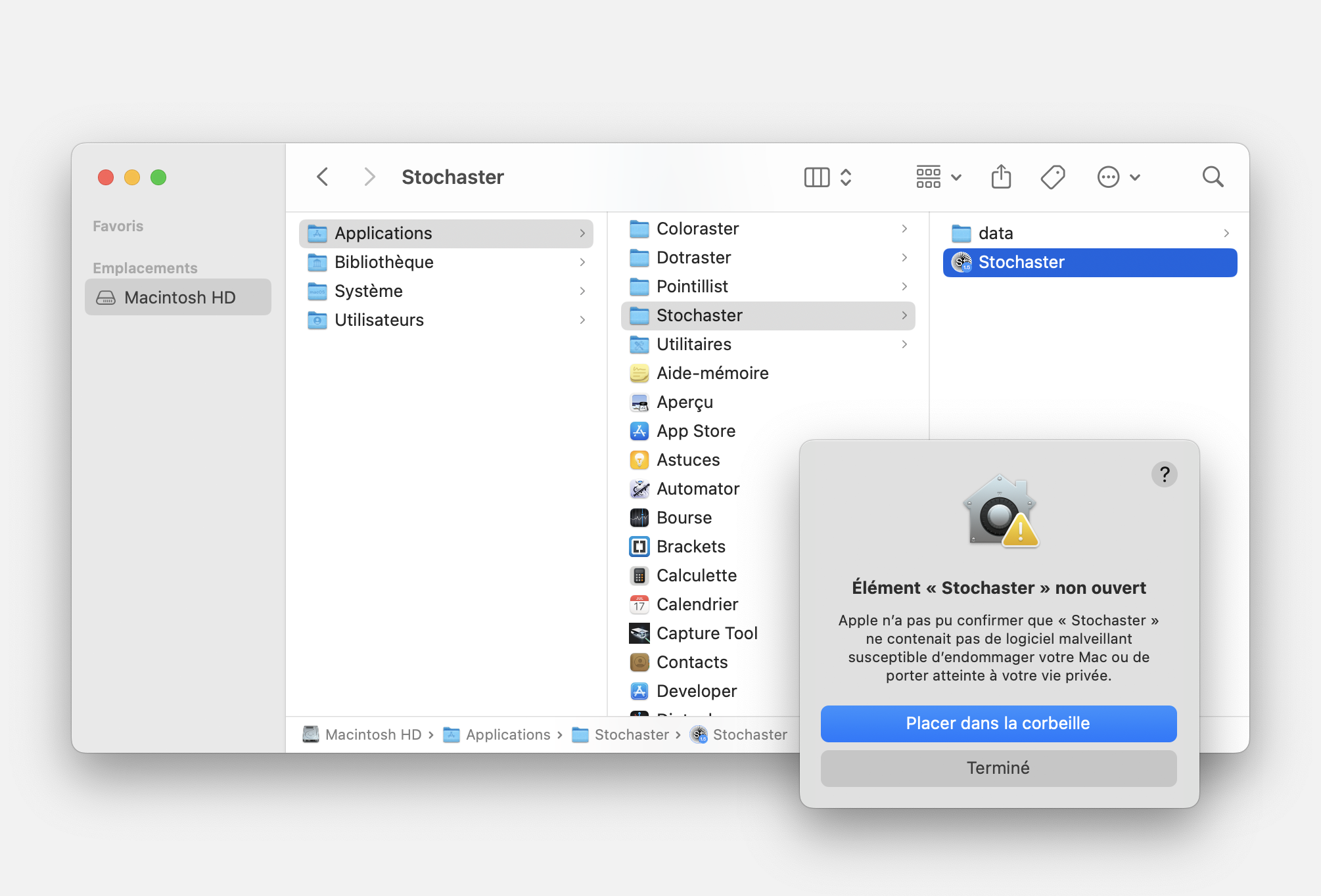
Sur Mac, les applications nécessitent une installation particulère pour fonctionner correctement. Dézippez les fichiers téléchargés et placez les dossiers "Stochaster", "Dotraster", "Pointillist" ou "Coloraster" complets, sans les renommer, dans le dossier Macintosh HD > Applications. Lancez les applications.
Impossible d’ouvrir l’application.
Ce message vous empêchera sûrement d’ouvrir votre application la première fois et le problème peut être résolu facilement. La solution consiste à placer l’application dans la liste des logiciel "bienveillants" de votre ordinateur.
Fermez le message et ouvrez l’application Terminal pour copier-coller 1 commande (respectez les espaces impérativement).
Stochaster
Dotraster
Pointillist
Coloraster
Relancez l’application. Si le message d’erreur réapparaît, vérifiez le nom de votre dossier ou le placement du dossier de l’application. Corrigez l’erreur et recommencez l’étape du Terminal.
Impossible d’ouvrir l’application.
Ce message vous empêchera sûrement d’ouvrir votre application la première fois et le problème peut être résolu facilement. La solution consiste à placer l’application dans la liste des logiciel "bienveillants" de votre ordinateur.
Fermez le message et ouvrez l’application Terminal pour copier-coller 1 commande (respectez les espaces impérativement).
Stochaster
xattr -r -d com.apple.quarantine /Applications/Stochaster/Stochaster.app
Dotraster
xattr -r -d com.apple.quarantine /Applications/Dotraster/Dotraster.app
Pointillist
xattr -r -d com.apple.quarantine /Applications/Pointillist/Pointillist.app
Coloraster
xattr -r -d com.apple.quarantine /Applications/Coloraster/Coloraster.app
Relancez l’application. Si le message d’erreur réapparaît, vérifiez le nom de votre dossier ou le placement du dossier de l’application. Corrigez l’erreur et recommencez l’étape du Terminal.
On Mac, applications require a specific installation to work properly. Unzip the downloaded files and place the complete folders "Stochaster", "Dotraster", "Pointillist" or "Coloraster" without renaming them into the Macintosh HD > Applications folder. Launch the applications.
Unable to open the application.
This message will likely prevent you from opening the application the first time, but the issue can be easily resolved. The solution is to add the application to your computer's list of "trusted" software.
Close the message and open the Terminal application to copy and paste 1 command (make sure to respect spaces exactly).
Stochaster
Dotraster
Pointillist
Coloraster
Relaunch the application. If the error message appears again, check the folder name or the location of the application folder. Fix the error and repeat the Terminal step.
Unable to open the application.
This message will likely prevent you from opening the application the first time, but the issue can be easily resolved. The solution is to add the application to your computer's list of "trusted" software.
Close the message and open the Terminal application to copy and paste 1 command (make sure to respect spaces exactly).
Stochaster
xattr -r -d com.apple.quarantine /Applications/Stochaster/Stochaster.app
Dotraster
xattr -r -d com.apple.quarantine /Applications/Dotraster/Dotraster.app
Pointillist
xattr -r -d com.apple.quarantine /Applications/Pointillist/Pointillist.app
Coloraster
xattr -r -d com.apple.quarantine /Applications/Coloraster/Coloraster.app
Relaunch the application. If the error message appears again, check the folder name or the location of the application folder. Fix the error and repeat the Terminal step.